

How do you enter the products you export by hand?
If you don't have your export declarations to hand, you enter your products on the same form. One row per product is enough: its tariff code, your own name for it, the markets you sell to and your buyer in each; and your price to the buyer and your yearly quantity if you know them.
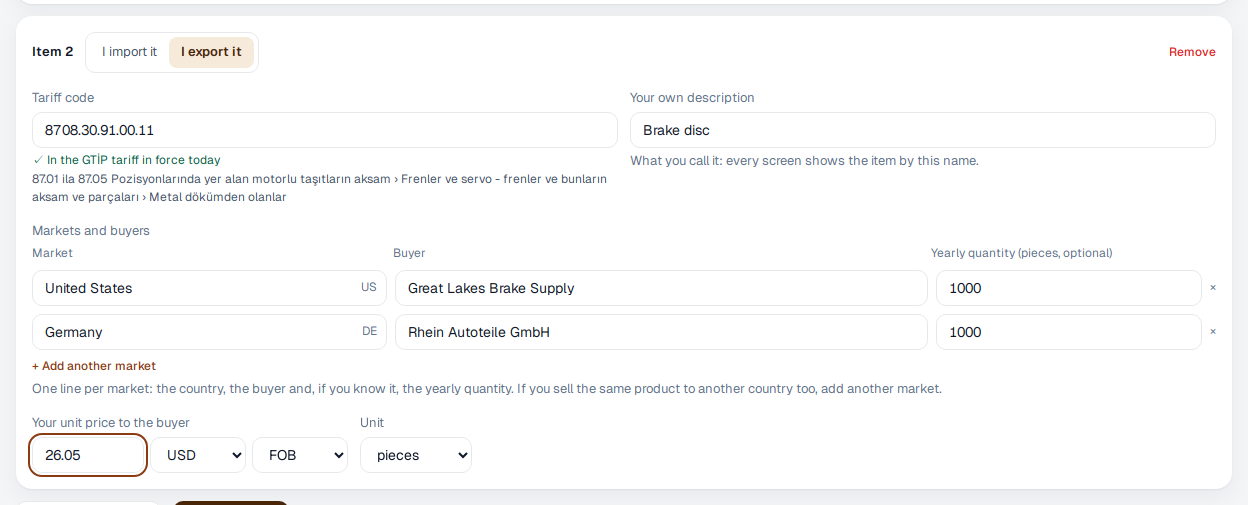
- In the “Your trade” step, press “Enter items by hand” and choose “I export it” at the top of the item. If you came from the export side of our website, the form already opens on it.
- Type the tariff code and the name you use for the product. We check the code against the tariff as you type.
- Under “Markets and buyers”, enter one line for each market: the country, your buyer's name and, if you know it, the yearly quantity. If you sell the same product to a buyer in the US and one in Germany, add the second market to the same item with “Add another market”.
- Enter your unit price to the buyer, its currency and the Incoterm (FOB, FCA, EXW…). The price is the same for every market; if it differs, change it for each market later on the Markets screen.
- Save. In the “Your buyers” step, check your markets and press “Watch these markets and go on”: your markets are watched only after this step.
On the first day the Markets screen shows no competitor prices yet: your place appears once you add a price you have heard, or once your buyer shares its offers on Eximcast. If you haven't entered your freight yet, your delivered price says “without freight”.