

No file? How do you enter your items by hand?
If you don't have your declaration list to hand, you can type your items one by one. One row per item is enough: whether you import or export it, its tariff code, your own name for it, where it comes from or whom you sell it to; and its price and yearly quantity if you know them.
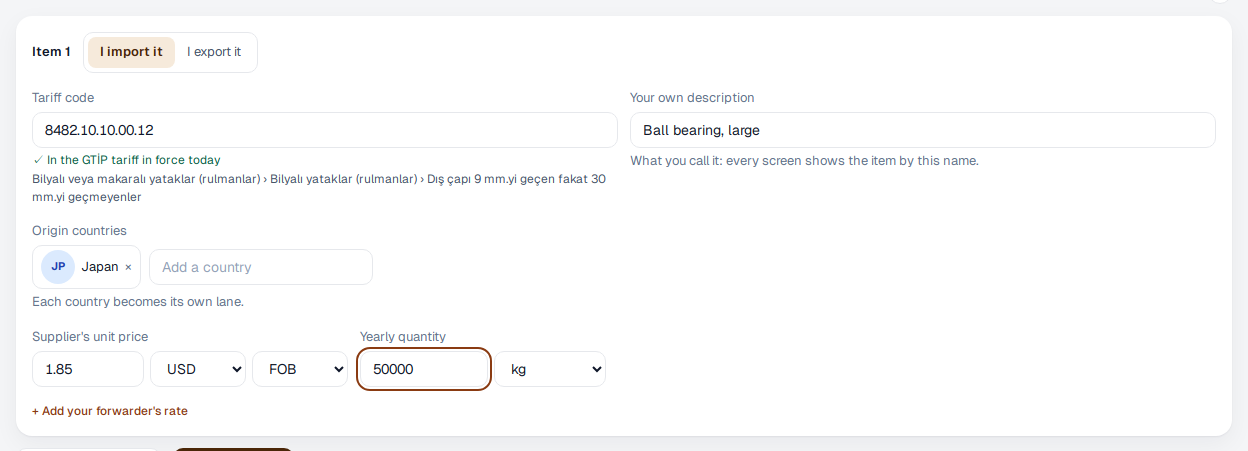
- In the “Your trade” step, press “Enter items by hand”. At the top of each item, choose “I import it” or “I export it”; if you came from the export side of our website, the form opens on “I export it”.
- Type the tariff code. We check it against the tariff as you type: if the code is there, a green tick appears with the code's official description below it. If it isn't, you can pick the right one from the codes that start the same way.
- Under “Your own description”, write the name you use for the product, and add the origin countries. Each country becomes its own lane.
- If you know them, enter the supplier's unit price, its currency, the Incoterm and the yearly quantity. If your forwarder has quoted for this lane, press “Add your forwarder's rate”. You can also add all of this later.
- Press “Add another item” for more items, and save when you're done. For the products you export, see the next page.
A lane without a price shows that the price is missing rather than a landed cost; “Add the price” adds it from there. Later on, you add new items under Company → Codes → “Add items”.